Night GPS running watch for Beginner Runner (at Wet/Rainy Conditions)

Hello all,

Yesterday I received my Garmin Forerunner 255, and yesterday night I put it to the test on my regular running route first to see how things look like. Below I share initial impressions and collected data from the night as extracted from Garmin Connect dashboard.

Please note that I haven’t yet had the chance to fine tune the GPS mode and heart rate calibration, so these may be affected by the lack of altitude compensation and/or tree canopy, but I think the overall trend can still be useful here.

Firstly, I was a bit concerned about the battery consumption of the watch (as I like to have it fully charged for morning runs), but by simply putting it on charge overnight did the trick for me to start each run fully charged.

Before going for my run (at 9:30PM), I intentionally ran a known flat route first, as I wanted to simulate an environment in which we trained quite often in the past (also with my daughter when she was younger, when she presented many times her GPS accuracy issues) — back then I was unaware of GPS calibration issues.

So in the middle of the run I noticed some pace spikes and decided to switch to multi-band GPS mode partway through. At some point later on in the run, I also noticed some strong wind. Unfortunately, I did not write down the timestamps for either case… I only know that I finished the run just before 6AM and switched back to GPS+GLONASS mode (as my wife was still running).

Below is the GPS pace graph:
So looking at this, I would believe that I switched to multi-band between 1AM and 2AM, when the pace variance curve stopped increasing. It still decreased slowly likely because of the GPS mode transition — it takes a few minutes to stabilise. And I would guess that at around 3:30 the wind picked up and made the GPS accuracy improve quite quickly.

Anyway, maybe the timestamps and hypothesis are not right and it’s difficult to know now, but I was impressed to see how quickly the GPS pace variance increased (and likely it was 16% higher due to altitude), and how it can potentially have affected so often our training data quality in the past.

Below is now the heart rate graph:
I found also quite interesting to observe the expected heart rate pattern here. In the controlled flat environment, the heart rate readings stabilised over time until reaching a plateau in the middle of the run. And likely when the GPS mode was switched (fresh signal coming in), we also observe the heart rate becoming more stable. I believe the multi-band GPS mode was more accurate than the GPS+GLONASS, leading to such behaviour. And this may be tricky for us to balance (although I believe in this particular case the impact of GPS mode was more significant than the moderate heart rate variance).

Below now is the training load graph:
This for me was the most intriguing behaviour… I have not yet read about training load other than it’s a relative metric. But I was not expecting it to positively correlate with the GPS pace variance in that way, and I would like to hear your thoughts on this :slight_smile: But one thing I started to consider is whether there is some GPS calibration issue in my running area that would lead to increased training load numbers while running in that zone… We had a new firmware update one year ago, not sure if it could (still) be related.

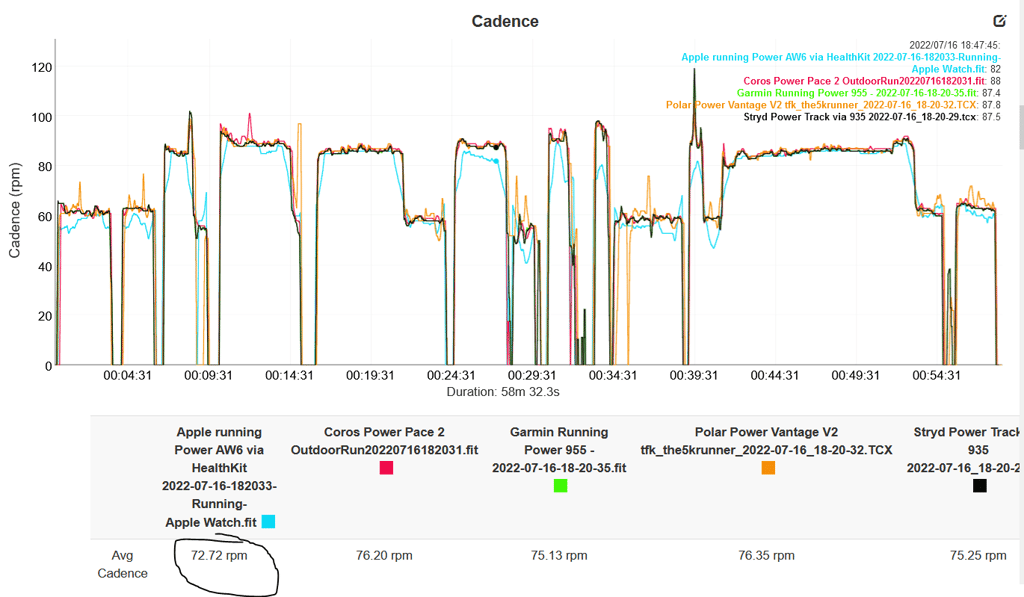
Finally, as a reference, below the cadence readings throughout the run (I forgot to extract elevation, but it was always around 21.5m gain per km):
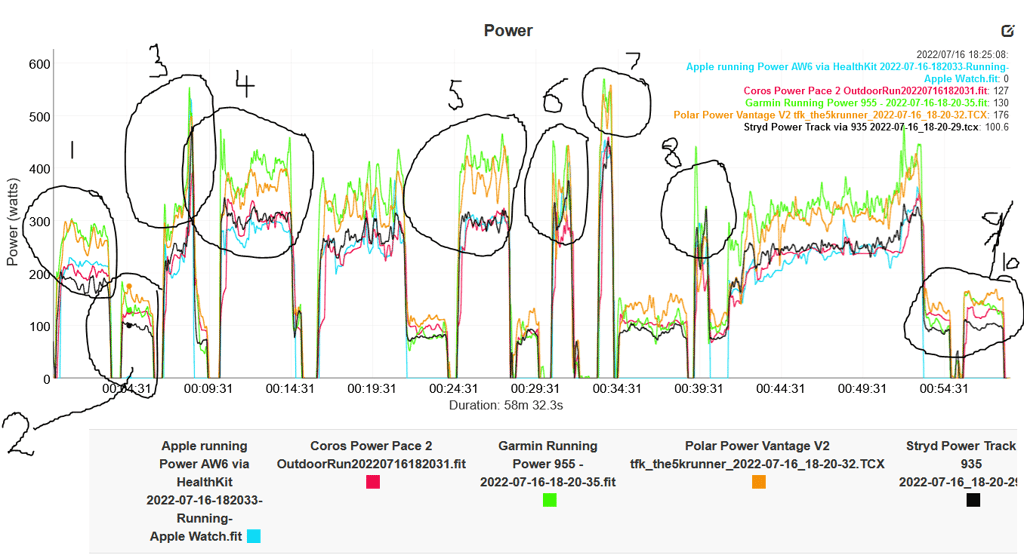
All in all, I’m very happy to have the Garmin Forerunner 255 and will keep exploring, learning and trying new things with it! And soon enough will also move it to a more challenging trail route. It’s definitely a great tool to better understand the running environment we train in.
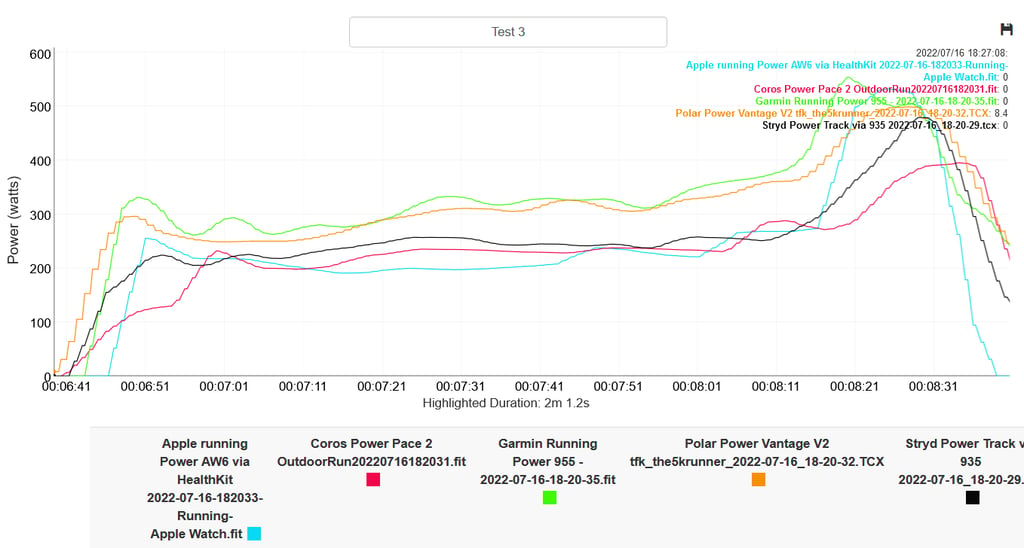
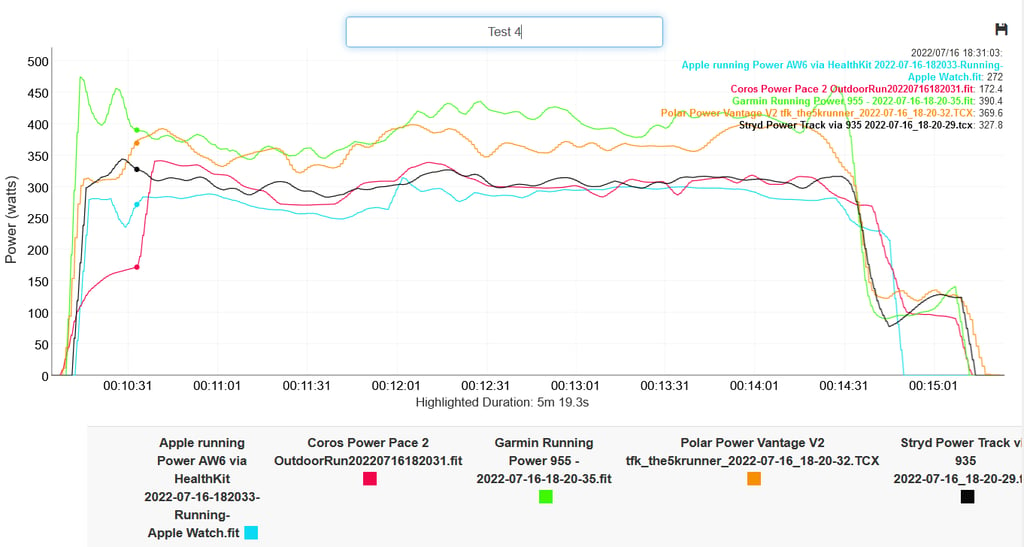
As a follow up here, to add on the first point I mentioned:

Firstly, I was a bit concerned about the battery consumption of the watch (as I like to have it fully charged for morning runs), but by simply putting it on charge overnight did the trick for me to start each run fully charged.

The Garmin Connect dashboard actually has nice features to control the GPS mode intensity and the display brightness, and turn off certain features if desired. Quite handy.

And regarding the training load I’m still puzzled… this run I observed the same behaviour. Then I tried to switch to GPS-only mode during the run in the morning, but training load stayed quite high regardless. Only solution was to indeed switch to multi-band mode, then it stabilised rapidly.

Another experiment I tried was during the day to just run on the flat open route again, but this time without any tree cover. But the training load didn’t increase then. I’m not sure whether it could be potentially impacted by the GPS pace variance itself, or even by some other route-specific factor… I tried to look it up but couldn’t find an explanation yet, other than that it seems to be indeed tricky to understand it.

Hi @Henry,

Thanks for the update!

I’m glad you found this! Yes, they can be dimmed or even disabled if you want.

Interesting findings! I am surprised, however, that the GPS pace variance really didn’t decrease much at all until around 3:30 AM. However, it makes sense if there are only tiny breaks in the tree canopy.

I know how hard it is to balance outdoor GPS accuracy and conditions (like tree canopy), but this is the reason I almost always run with multi-band GPS enabled now (even if just for the key segments). I’ve found that decreasing the pace variance from > 0.5 min/km to less than 0.1 has vastly improved my training data quality. However, this isn’t always possible if you’re running in heavy tree cover due to battery drain concerns. My wife has also noticed a massive difference in training load accuracy (and pace consistency) so now she will also insist we always have multi-band GPS enabled during quality sessions.

I would love to hear more about this once you receive the outdoor GPS reference device, as I wonder how accurate (or inaccurate) GPS tracking is where you train. Based on how this graph is inverse to the GPS variance graph, I believe your conclusion that the multi-band mode is more accurate is spot on.

I think this is where having a reference GPS device will really help you. It makes it much clearer to know when switching to multi-band mode is a benefit or detriment.

This is particularly interesting. You are right in that GPS errors can influence training load calculations from Garmin watches, however, pace variance should not greatly impact optical heart rate readings (which the Elevate v4 is). Also, the GPS chipset should not be impacted much at all unless the GPS variance is very high. In fact, from what I’ve read, the Airoha AG3335M should have little to no sensitivity to pace errors, and the Elevate v4 should not be significantly influenced by GPS accuracy. As such, I would say that you do actually have a GPS calibration issue in that specific running zone.

It sounds like you’re already very aware of the relative nature of GPS accuracy metrics, but this post explains the Garmin GPS accuracy scale in more detail:

GPS Running Watches for Heart Rate

Luckily, on Garmin watches you can change the GPS baseline calibration period to multi-band mode (look under ‘activity settings’), meaning it is far more useful than a chipset that adjusts every 24 hours.

One thing to consider here is that runners exhale trace amounts of body heat and moisture. While a very small amount, they can accumulate over a long run, and this could explain the training load increase if no other accuracy issues are present. While the increase would be relatively small (I would think), it may be that your usual GPS accuracy levels are so good that even a small increase in pace variance shows up. To test this, I would try running the route (without any tree cover) and completely open the GPS mode to multi-band so there is no environmental restriction. Does the training load still increase? If so, there is another accuracy source that you might want to look into — if there is nothing obvious, I would guess it is GPS calibration drift.

Does your GPS watch have a Stryd footpod as backup? If not, it won’t stabilise training load during GPS outages, only during clear-sky sections.

I only just read this now, but I think what I mentioned above may be the case. Runners can generate heat and motion artefacts. For example, wrist movement and skin contact artefacts occur during running and this could build up enough to trigger the Elevate v4 HR sensor inaccuracies if there is no GPS stabilisation. Since you’ve already tried the open route experiment, I think this is likely the reason for your increasing training load during tree-covered routes.

These are all really interesting findings. Thanks so much for sharing!

Hello,

So it’s been a week since my last post, and I have a few updates to share here.

After a couple of runs, we decided to move the watch from our usual flat route to our daughter’s school running track.

The first interesting finding there is that GPS pace variance readings are always increasing whenever we run under tree cover, even if no one is on the open route sections.

The figure above illustrates that: at 4PM we left the tree-covered section, and the readings are still showing elevated variance. I know this would be the expected behaviour in case of a GPS calibration source in the route, but it’s just to indicate a different observation than in my previous post (in our usual route, it only seemed to happen when running in tree cover). The difference here might be due to surrounding buildings, but I still need some time to investigate this hypothesis, e.g. to run different sections of the route.

Nevertheless, I followed your suggestion Henry, and in the last few days I’m always enabling multi-band GPS mode during quality sessions, even if it drains more battery. Likely I end up charging the watch more often in heat mode, but this way I see the GPS pace variance and training load readings are well controlled during the whole session.

The graph above illustrates the GPS accuracy during last run, which looks better than the one in my previous post I would say.

Additionally, we have that Stryd footpod running on her shoe, so potentially being able to maintain pace accuracy in case the GPS levels are degraded.

As previously mentioned, for training load the Stryd footpod doesn’t seem to change anything. Checking its user manual, they don’t mention specifically GPS fusion, but rather a “running power” metric (https://media1.sitexo.com/cache/documents/53e3409084e586e71caa6980/Navodila_za_uporabo_RS985.pdf). When I purchased it I thought it would be the same, but I’m not sure now, or maybe it’s only effective to stabilise some specific GPS accuracy issues.

To sum up, I think the GPS running watch has been quite educational for me in this first week. When I have some time, I’ll try to run more experiments for GPS accuracy, and will post here if I find anything new.

Well, just to contradict myself, last run’s GPS readings went through the roof.

As the Stryd footpod is completely automatic and doesn’t have a real-time GPS override interface, I cannot know how it actually behaved during the run. For example, if its auto mode was unable to recognise the high GPS variance for a while, and didn’t switch to footpod pace properly.

Also, I wonder if that was all caused by outdoor GPS interference alone, or even indoor GPS reflection as well. If the latter could show such pattern for example when strong wind picks up, resulting on the GPS multipath signals that were stable on clear sections to start reflecting off buildings, thus impacting the watch GPS readings.

Ideas for these theories are: (a) switch GPS mode from auto to constantly multi-band; (b) assess outdoor GPS accuracy with a dedicated reference GPS device (luckily will get one soon too, it was just shipped from Garmin :slight_smile:); (c) run on our open route more often. We usually run there once a week, but not sure if the quite dense tree-covered weather from the previous days rather requires us to do it at least twice a week then.

Hi @Henry, thanks a lot for yet another update! It’s fascinating to hear about your findings. Sorry for the late reply; it’s been a super busy week for me.

This, in particular, is quite interesting. Outside of any apparent route factors, it would seem to indicate GPS multipath from buildings, as you’ve mentioned. Out of curiosity, what period do you have your GPS baseline calibration set to? I would be curious to see how significant the multipath is by running on an open track and then comparing (with the baseline set to something like multi-band for 720 hours of training) the tree-covered values. If the variance goes to 0.2 min/km, it’s not as severe as 0.5 min/km, for example. Alternatively, you could use the CEP accuracy index on the analytics page for a more ‘absolute’ reading.

These are far better accuracy levels! It’s hard to tell if it’s worth it with the likely increased charging frequency, but have you noticed a significant (or just noticeable) improvement in your training data quality or general feeling after morning runs?

I’m wondering this, too. Surely, it’s outdoor GPS multipath entering through the route section you said you were now running in? It seems too high for open terrain unless you are sprinting (which seems unlikely at 1 am!) or have another GPS interference source like a tall building.

A and B sound great! C, I’m not sure about. I would imagine the GPS accuracy would stabilise overnight and only be disrupted (and, therefore, show increased variance) when there is movement around the dense route sections. I’m not sure when you normally run, but it seems odd that those GPS errors would suddenly appear at around 12–1 AM. I am leaning towards these errors being from outdoor multipath (assuming the multi-band mode was indeed active).

Super excited to hear your findings with a reference GPS device! You’ve also inspired me to do some around-the-route tests too!

Hi Henry, thanks again for your input here! This time I’m the one rather late on responding…

I’ve been a bit busy with the Garmin Community Forum, as in the past couple of weeks I incorporated the altitude compensation formula for GPS accuracy (Garmin GPS altitude compensation - Community - Garmin Forum) as well as the alternative corrections for the GPS distance estimation (Garmin GPS distance correction methods - Community - Garmin Forum), and then have been exploring these results :slight_smile:

Out of curiosity, what period do you have your GPS baseline calibration set to?

You’re right there! Up until my previous message, I still hadn’t changed the default GPS mode (which I think was GPS+GLONASS). But then I did switch it to multi-band and started to see less variance in the readings.

Nevertheless, I still find it a bit difficult to interpret the results and have not yet identified potential route-specific sources. Although in the meantime I did change my running route — which was in a new urban development area, but seemed to have some building reflections — and that seems to have improved my GPS accuracy too.

Surely, it’s outdoor GPS multipath entering through the route section you said you were now running in?

I think that is indeed the case. What I’m doing is to run two routes, one facing north and the other one facing south. So even there are very small open sections, it can create some GPS multipath during the run due to the opposite building orientation.

And more interestingly what I also discovered is that those high GPS variance readings seem to be caused by a very specific condition we have in Brazil: many large-scale urban construction projects across the whole country (Garmin GPS accuracy in urban environments - DCRainmaker)

Even though there is none close to me, our local running community reported several times that our city is being influenced by that too. For the past two weeks, we can see the GPS track wobbling quite noticeably on the horizon sections, and it’s been quite inconsistent as well (unusual for our region).

So I did switch the GPS watch to constantly use multi-band mode in the past few weeks. And last run’s trend is quite interesting — we can clearly see when the GPS accuracy starts to be a bit more under control exactly in the period when the multi-band is active:

On this note, just to conclude on one of my hypotheses:

(c) run on our open route more often

Here I think you were right as well — running more on open routes didn’t seem to have a major impact on the variance readings from the GPS watch. But, again, after discovering the urban construction context, that became a clear candidate to explain it.

So, once I receive the reference GPS device, will still explore it running side-by-side with the other watch to learn more, but then once it’s set up and running I will share more insights here!

Also see: Garmin GPS Running Watch Reviews - DCRainmaker

And: Running Training Tips - Runner’s World

Hi @Henry,

I saw your posts over there; they’ve been very informative (I’ve learnt a lot researching the topics you’re bringing up!). I wish I had a bit more time to reply, but I’ve been keeping up with all of the conversations.

Aha! I had a feeling this might be the case, and it makes a lot of sense.

I can relate to this! I’ve been trying to look more into GPS accuracy (and the consumer-grade watches we use to monitor it) myself recently, and I’ve come to the conclusion that, at least to me, the GPS-only mode isn’t particularly useful for quality training sessions. Even the ‘absolute’ CEP values are very hard to interpret due to how many environmental factors can influence them. I’m also in a similar situation where I’ve been having odd GPS spikes in some sections of my running routes that I simply can’t explain. I am considering trying out some more specialised GPS chipsets to see if they make a difference, but I think the issues inherent with consumer GPS chipsets may make this a challenge.

This is very interesting!

One question — is your GPS running watch suited to the route it’s used on (regarding multi-band GPS support)? There is a significant improvement when it’s on, but over a period of almost 12 hours of training, I would expect to see much more of a drop in variance. Alternatively, are there potential gaps around the route or tall buildings that could act as a GPS multipath entry point when the multi-band mode is running?

I’m very much looking forward to hearing more when you have the reference GPS device set up. In the meantime, I would recommend looking into the GPS mode performance and/or potential multipath entry points around your training routes, as it seems like some errors may still be getting in.

Training | Runner's World

Hi all,

One interesting note I’d like to add on GPS pace readings.

I’m currently travelling and checking the Garmin Connect dashboard while no one is running the usual routes. Now that I’ve got a reference GPS device as well, I can see how the watch and reference readings are associated.

Below is the GPS pace variance from the last 48 hours. Blue bars are from the main watch, and grey trace is from the reference device.

I would say there is some association between those readings. And most likely the main watch is picking up the same GPS multipath fluctuations as the reference device.

Now, I have no idea what could be causing the reference device to behave like that. But at least I start to better think on a potential cause why in the past I saw all those fluctuations in the main watch.

Note: both devices are set to multi-band GPS mode. And I left a few route sections open to GPS signal while we’re away.

Oh and I had forgotten to address this:

One question — is your GPS running watch suited to the route it’s used on (regarding multi-band GPS support)? There is a significant improvement when it’s on, but over a period of almost 12 hours of training.

I’m under the impression there is something wrong with my GPS pace sensor in the main watch. After inspecting different training points and conditions, I think it is capable of picking up high GPS variance levels (i.e. to follow reference device trends during heavy tree cover sections), but it doesn’t go below a certain minimum baseline.

The last 8 hours illustrate this behaviour. The main watch average is around ±0.2 min/km, whereas the reference device has been consistently below that.

As mentioned in my previous post, this is on an empty flat route with multi-band mode active.

And I’ve also reported and briefly discussed the issue here: Coros support - GPS accuracy issues

I’m not sure if there is something that got into the GPS chipset after a while (for a few weeks it was running on tree-covered routes) that could explain that.

But so far I have not had the time (or courage) to try to open the GPS chipset and examine that. I’m also afraid of breaking it.

And such behaviour doesn’t harm much either for now.

Hi @Henry,

Thanks for the update! The correlation between main watch and reference device GPS variance readings is very odd, and I’ve never seen such a direct example before. I would expect some similarities in certain route conditions, but these are so closely related that it seems (like you said) that the same GPS multipath is impacting both devices.

How close are these devices? I know they’re in entirely different locations on the route, but are they located near the same tall buildings, perhaps?

I’ve also been intending to do some of my own testing regarding the Garmin Forerunner 255 and use it on a flat track as I’ve had a couple of other readers reach out about similar GPS baseline situations. In those two cases, both readers noticed far lower GPS variance when the device was running in multi-band mode and much higher variance when the device was either in GPS+GLONASS mode or running on a vented/tree-covered surface. It’s led to me being very curious, and I want to test this further. I will let you know if I discover anything!

If you open them, GPS chipsets can be quite easy to damage, so my first suggestion would be to try swapping the watch mode with your reference device for a while and see if that exhibits the same behaviour. It’s still a bit arduous and you won’t get reference readings for a while, but it should allow you to assess if the GPS chipset currently in the main watch is performing as expected or has something inside.

Hey Henry, thanks for your response!

The reference GPS device is mounted on the open section of the route. The tree-covered section facing the open route had the GPS signal blocked while we were away. Also, the main watch is on another route section (hilly terrain). Due to these, I would rule out the possibility of the reference device receiving some GPS multipath from the main watch route section.

That’s why I rather thought it could be the other way around, i.e. the hilly section slightly open could have led the GPS multipath from the tree-covered route enter the chipset and therefore show such association between device readings. And that could only be observed while the routes were completely empty and with everything running in auto GPS mode.

After observing that, I kept inspecting the reference GPS device traces in particular and found an even more intriguing pattern (at least for me), as I described here: Garmin GPS accuracy in varying terrain - Cleveland Clinic heart rate reference

I thought about writing in the Garmin Community Forum to see if any other people with reference GPS devices would also observe such a pattern. Let’s see if someone responds. :slight_smile:

The training data on the Garmin Connect platform is fascinating! I just checked my watch (which has only been set up for a couple of days, as I just started a new training block), and I have trends similar to yours.

While it’s too early to draw conclusions, I see a significant GPS variance increase at around 3 PM daily. Interestingly, I am currently training on the 15th floor of a building in a hilly urban area, so I think GPS multipath (caused by tall buildings) would have a big impact at this height as opposed to at street-level. I also have a 720-hour calibration period set for my multi-band readings, but even my GPS+GLONASS readings show a similar trend.

Like you, I was curious if the temperature or canopy density could explain the intensity of these peaks (I had a theory the second and third peaks might be on days of higher temperature/tree coverage), but this doesn’t appear to be the case, as you can see below. The temperature was higher during the first (smaller) GPS variance peak than during the second day! The canopy readings are similar.

I will keep these devices collecting data over the coming days, but I think your theory about atmospheric GPS interference could definitely be impacting the watches. However, I don’t know how we could measure this without having a device to capture satellite signal strength, as it would be based on that instead of temperature. While not ideal, perhaps a cheap GPS signal meter could be purchased and placed next to the watch? The output could then be measured, which would be an indication of satellite signal levels throughout the day. I’m not sure if this would work, but that’s the first idea that comes to mind.

Interestingly, on the days I have data for so far, I also see another, smaller GPS variance spike at just after 6 AM. The training area I am currently in is east-facing, and the current sunrise time here is 5:30 AM. I’m looking forward to collecting some more data and seeing the results!

After continuing to collect GPS data, I now see data that is much harder to interpret. While my GPS variance levels throughout the day still tend to be higher, I am also seeing some spikes throughout the night and the trend that was there earlier (a significant increase during the afternoon) no longer seems to be the case. I checked both the multi-band and GPS+GLONASS modes and both now appear quite different.

I have one potential explanation, but I won’t be able to test it until next week, unfortunately. Has your GPS watch kept following the same trend?

Hey Henry, thanks for investigating your own outdoor GPS variance measures, it’s quite nice to have someone else’s perspective on this as well.

I’ve just checked again my GPS readings for the last 7 days, and it shows a similar pattern:

However it’s also nice to see in this case that two days had rather small variance increase during the day.

In one of the days, temperature indeed didn’t increase that much, but for the other it actually did:

And I’ve just tried to also check the satellite signal in a public database and I don’t see a clear pattern for that yet. But I’m on my phone now and it was a very quick visual inspection of the table numbers.

It remains a puzzle for me…

Hi @Henry,

It’s interesting how much more obvious the GPS variance trends are in your data than in mine. I just got back to New Zealand, and I plan to set up my reference GPS devices as soon as the weather improves (it’s been raining constantly since I got back so far!). I have four GPS watches with me, so I also want to see if the results are consistent across devices — especially as the temperatures here are less extreme.

I will let you know what I come across!